Symptom:
0x800b0109 iis client certificate
RetrieveTokenFromStsServerImpl failed with error 0x87d0027e
[CCMHTTP] ERROR INFO: StatusCode=401 StatusText=PreAuth token validation failed
Invoke-WebRequest : Server Error
403 - Forbidden: Access is denied.
You do not have permission to view this directory or page using the credentials that you supplied.
In Zeile:3 Zeichen:1
+ Invoke-WebRequest -Uri “https://
Cause:
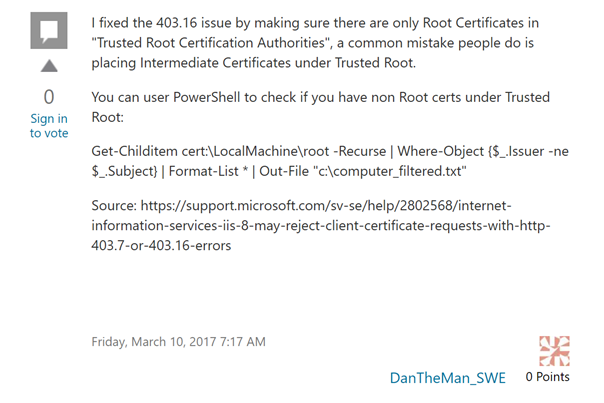
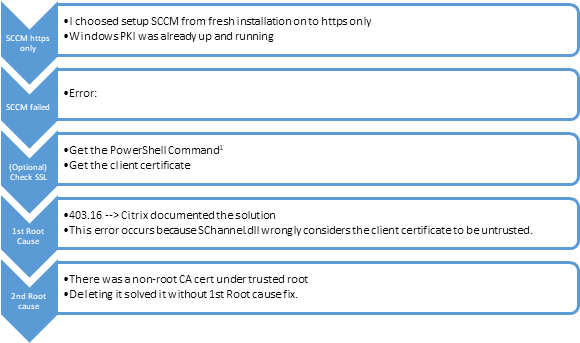
This error happens in the end because of an non-root authority deployed/installed as into trusted root CA on the MP/SCCM Primary Server.
Solution
See 2nd Root Cause at first as your solution. It was mine.
Otherwise 1st Root Cause could also help you out.
Details
Troubleshooting-Steps:
Check SSL authentication with the machines certificate:
Source: Verify HTTPS enabled CM Management Points with PowerShell - Deployment Research
| ## Shows you your machines certificates Get-ChildItem -Path “cert:\LocalMachine\My” ## Optionally - you should check, if you can use tls12 –> ## [Net.ServicePointManager]::SecurityProtocol = [Net.SecurityProtocolType]::Tls12 ## Sets your client certificate and authenticates with this cert to the webserver $cert = Get-ChildItem -Path “cert:\LocalMachine\My\1234567890ASDFASDF1234123412341234…” Invoke-WebRequest -Uri “https://your-fqdn-to-MP/sms_mp/.sms_aut?mplist” -Certificate $cert |
|---|
Before (bad … denied):
Invoke-WebRequest : Server Error
403 - Forbidden: Access is denied.
You do not have permission to view this directory or page using the credentials that you supplied.
In Zeile:3 Zeichen:1
+ Invoke-WebRequest -Uri “https://
After (good – Output has been cuted for privacy reasons )
Content : <MP Name=
Name=“SSLState” V
ParsedHtml : mshtml.HTMLDocume
Forms : {}
InputFields : {}
Links : {}
Images : {}
Scripts : {}
AllElements : {@{innerHTML=; in
outerText=; tagNa
@{innerHTML=<HEAD
innerText=9058; o
Value=“63”></Prop
StatusCode : 200
StatusDescription : OK
RawContentStream : Microsoft.PowerSh
RawContentLength : 234
RawContent : HTTP/1.1 200 OK
Pragma: no-cache
Connection: close
Content-Length: 2
Cache-Control: no
Content-Type: tex
Date: Sun, 05 Dec
Server: Microsoft
X-Powered-By: ASP
<MP Name=
Root Cause 403.16 and the fix / solution
HKEY_LOCAL_MACHINE\SYSTEM\CurrentControlSet\Control\SecurityProviders\SCHANNEL Value name:ClientAuthTrustMode Value type: REG_DWORD Value data: 2
For more details see here: Could not sign CSR Caused by: java.io.IOException: Cannot obtain certificate from certsrv authority: 403 Forbidden (ZDM-certsrv/1.0 - 403 16) (citrix.com)
2nd Root cause
Found out, that this was the case.
Could delete this certificate and it works again.
Even without/deleted 1st root cause.